Why You Should Check Your Card’s Validity?
Although the Ayushman Card does not have a fixed expiry date, several situations can render it inactive without your knowledge:
- The National Health Authority (NHA) periodically revalidates beneficiary lists against updated SECC data
- A family member’s record may be flagged for verification if details don’t match Aadhaar updates
- Cards can become temporarily inactive during system updates or database migrations
- Senior citizens registered under Ayushman Vay Vandana may need refresh checks
The worst time to discover an inactive card is at a hospital reception when you need urgent treatment. Checking validity proactively — especially before any planned hospitalisation — ensures cashless treatment proceeds smoothly.
Quick Rule: Check validity at least once every 3 months if you have a chronic condition or regularly visit hospitals. Check immediately before any planned admission.
Pick Your Card Validity Check Method
All methods produce the same active/inactive result — choose what fits your situation.
Check Validity via PMJAY Beneficiary Portal
Step 1: Visit the Official Portal
Open beneficiary.nha.gov.in in any browser.
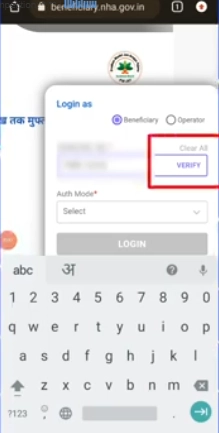
Step 2: Login
Click “Beneficiary” → enter your Aadhaar-linked mobile number → captcha → OTP. You’re inside the dashboard within 30 seconds.
Step 3: Search Your Record
Set the dropdowns:
- Scheme: PMJAY (or PMJAY-Vay Vandana for 70+)
- State, District
- Search By: Aadhaar (recommended)
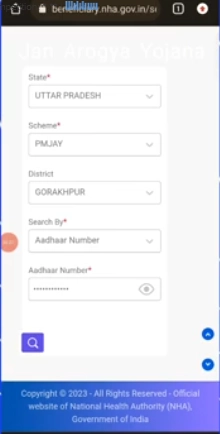
Click Search.
Step 4: Read the Card Status
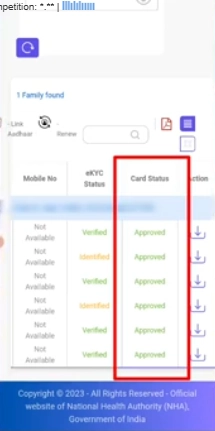
The result shows your card with one of these states:
- Active / Approved — Card is valid, ready to use at hospitals
- Inactive / Suspended — Card needs reactivation (see Section 7 below)
- Pending Verification — Recently updated, waiting for NHA confirmation
Step 5: View Detailed Info
Click your name to see expanded validity details — date of issue, last verification date, and any flags requiring attention. Also see the status check guide for more on each status type.
Check Validity via Official Ayushman App
Step 1: Open the Official App
Open the Ayushman Bharat app (verify publisher is “National Health Authority”). If you don’t have it, install from our Ayushman App download guide.
Step 2: Login
Login with your Aadhaar-linked mobile + OTP. Select your preferred language.
Step 3: Tap Search Beneficiary
Choose state, district, and search method (Aadhaar Number is the most accurate). Tap Search.
Step 4: View Validity Status
Each family member appears as a card with a coloured validity badge:
- Green = Active
- Yellow = Pending
- Red = Inactive
Tap any member for detailed validity info, last refresh date, and reactivation options.
Check Validity via QR Code Scan
How QR Validity Check Works?
Every Ayushman Card has a unique QR code that encodes the card’s PMJAY ID and a live verification link. Scanning the QR fetches real-time validity from the NHA database.
Step 1: Have Your Card Ready
Use either the printed card or the PDF card on your phone screen.
Step 2: Open the Ayushman App
Open the official Ayushman Bharat app and tap the QR Scan option (icon usually in the top right or in the menu).
Step 3: Scan the QR
Point your camera at the QR code on your card. The app verifies it within 1–3 seconds.
Step 4: Read the Verification Result
A pop-up displays:
- ✓ “Card Verified — Active” (green)
- ✗ “Card Inactive — Action Required” (red)
- ⚠ “Invalid QR” (yellow — likely damaged print; reprint card)
This is the same scan that hospital staff perform when you arrive for treatment.
Check Validity at a PMJAY Hospital
Every empanelled PMJAY hospital has a Pradhan Mantri Arogya Mitra (PMAM) desk — also called the Ayushman Mitra desk. Visit the desk with your card and ask for a validity verification.
The PMAM operator:
- Scans your card’s QR code
- Verifies your details against the live PMJAY database
- Confirms the available balance from your ₹5 lakh annual coverage
- Issues a verification slip you can keep for reference
This is the most authoritative check because it’s the same verification done at the time of treatment. Use this method before planning a hospitalisation — find empanelled hospitals through our Hospital List guide.
What Active vs Inactive Means
When You Should Check Validity
Five key moments where a quick validity check saves stress later.
₹5 Lakh Coverage Refresh — What Resets and When
The Ayushman Card’s annual coverage limit of ₹5 lakh per family automatically refreshes every financial year. Here’s how the refresh cycle works:
- The annual limit resets on 1st April each year — even if you’ve used the full ₹5 lakh in the previous year
- There is no application or renewal required — the refresh is automatic
- Past treatments are not affected — only the available balance is refreshed
- Senior citizens under Vay Vandana get their additional ₹5 lakh top-up refreshed too
- Both rural SECC and urban SECC families follow the same refresh cycle
The annual refresh applies regardless of how many hospital admissions happened during the year. So if a family used ₹3 lakh in November 2025 and ₹2 lakh in February 2026 (total ₹5 lakh, full limit reached), they get a fresh ₹5 lakh available from 1st April 2026 onwards.
Common Validity Check Issues
Issue 1: Card Shows Inactive Suddenly
Cause: Periodic NHA database revalidation or recent Aadhaar update.
Fix: Re-run eKYC first. If unresolved, visit CSC for biometric reset.
Issue 2: QR Code Won’t Scan
Cause: Faded print, scratched card, or low-quality photo on phone screen.
Fix: Re-download a fresh PDF from beneficiary.nha.gov.in — see our download guide. Print on a fresh A4 sheet at higher quality.
Issue 3: Portal Shows “Beneficiary Not Found”
Cause: Wrong state/district selected, or family record migrated.
Fix: Try alternate search methods (Aadhaar → Mobile → Family ID). For 70+ seniors, switch scheme to PMJAY-Vay Vandana.
Issue 4: Hospital Says Card Is Invalid Despite Online Showing Active
Cause: Hospital database may be out of sync, or the hospital itself may not be empanelled.
Fix: Verify hospital empanelment at hospitals.pmjay.gov.in. Insist the hospital PMAM scan the QR live. If issue persists, call 14555 from the hospital.
Toll-free · 11+ Indian languages · Monday to Saturday
Frequently Asked Questions
Does the Ayushman Card expire?+
How can I check if my Ayushman Card is currently active?+
Does the ₹5 lakh coverage refresh every year?+
What if my card shows inactive but I haven’t done anything wrong?+
How do I know if my Ayushman Vay Vandana (70+) card is active?+
Can I check validity for all family members in one search?+
Is checking my Ayushman Card validity free?+
How often should I check my Ayushman Card validity?+
Official sources: pmjay.gov.in · beneficiary.nha.gov.in · Helpline: 14555